GIGABYTE
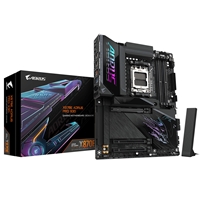
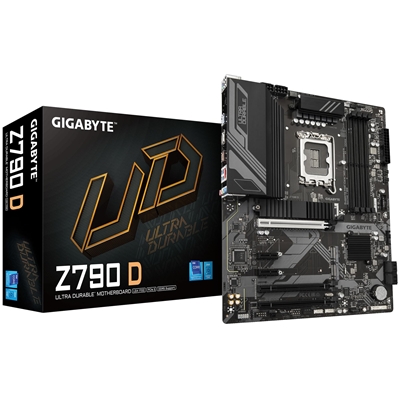
Gigabyte Z790 D Ultra Durable Intel 1700 Socket Motherboard, ATX, 4x DDR5 Slots, 3x M.2 Sockets, 2.5GbE LAN, 1x DisplayPort / 1x HDMI Port
£
142.93
£
119.11 excl. VAT
VAT: £
23.82
⚠ Only
8 left in stock
Next Day: £
6.00
Gigabyte 3-Year Return-To-Base WarrantyWarranty Length: 3...
| Stock Code | MBGIG-Z790D |
|---|---|
| Part Number | Z790 D |
| EAN | 4719331861186 |
| Weight | 1.75 kg |
| Category | Motherboard - Intel |
Product Description
Z790 D (rev. 1.0)
Key Features
Supports Intel Core 14th/ 13th /12th processors
Unparalleled Performance: Twin 12+1+1 Phases Digital VRM Solution
Dual Channel DDR5: 4 x DIMMs with XMP 3.0 Memory Module Support
Next Generation Storage: 3 x PCIe 4.0 x4 M.2 Connectors
Advanced Thermal Design & M.2 Thermal Guard: To Ensure VRM Power Stability & M.2 SSD Performance
EZ-Latch: PCIe 4.0x16 Slot with Quick Release Design
Fast Networks: 2.5GbE LAN
Extended Connectivity: DP, HDMI, Rear USB-C 10Gb/s
Smart Fan 6: Features Multiple Temperature Sensors, Hybrid Fan Headers with FAN STOP
Q-Flash Plus:Update BIOS Without Installing the CPU, Memory and Graphics Card
Durable Performance
GIGABYTE Ultra Durable motherboards built with optimal components inside out provide the prime performance and timeless platform.
Digital VRM Design
The best VRM design ever built with the highest quality components.
12+1+1 Phases digital PWM + Low RDS(on) MOSFETs
Unlock DDR5
DDR5 Overclocking Up to 7600 and Beyond
Thermal
Enlarged MOSFET Heatsink
Future Connectivity
The ultimate connectivity with blazing data-transfer speeds through the next generation network and storage.
2.5GbE LAN
Supercharge your gaming with 2.5GbE LAN Achieve lightning-fast speeds, minimal lag, and unbeatable performance to elevate your gaming setup and dominate the competition.
PCIe 5.0 / 4.0 Hardware Design
Featuring PCIe 5.0 x16 slot and PCIe 4.0 M.2 slot support, GIGABYTE Motherboards are ready to work with the PCIe 5.0/ 4.0 devices to provide the superior performance.
Hi-Fi Audio
High-End Audio Capacitors
These high quality capacitors help deliver high resolution and high fidelity audio to provide the most realistic sound effects.
Audio Noise Guard
Essentially separates the board's sensitive analog audio components from potential noise pollution at the PCB level.
Easy Friendly
Innovative and intuitive hardware, software, and BIOS interface design to create your personal style.
EZ-Latch
Unlock the latch of the PCIe slot easily when remove the graphics card in the PCIe slot.
Q-Flash Plus
Update the BIOS easily without installing the CPU, memory, and graphics card.
STEP 1: Plug the 24-pin and 8-pin power supply cables into the motherboard.
STEP 2: Download the motherboard BIOS file and rename it to "gigabyte.bin". Save it to a USB flash drive formatted in FAT32. Insert the USB flash drive into the Q-FLASH PLUS USB port.
STEP 3: Press the Q-FLASH PLUS button, and the motherboard will start updating the BIOS automatically.
Smart Fan 6
ensures optimal cooling and quiet operation for your gaming PC, with support for PWM/DC fans and pumps, customizable settings, and intuitive temperature monitoring.
High Current Support: Each fan headers support PWM and DC fan and Water Cooling Pump , and up to 24W (12V x 2A) with Over-Current Protection.
Precision Control: Multiple temperature/fan speed control points for precise fan curve.
Dual Curve Mode: Slope/Stair dual mode for different user scenario.
Fan Stop: Fan can stop completely below users' specified temperature point.
Smart Fan 6 BIOS UI
Enhance Fan Curve UI
Enhance fan curve control with an expanded number of control points, from 5 to 7, and a larger fan speed graph, enabling users to have more precise and effortless control over fan curve settings.
Slope/Stair Dual Graph Mode
Switch between Slope and Stair modes to adapt to various user scenarios. Slope mode provides a linear fan speed curve, while Stair mode maintains a constant fan speed within specified temperature intervals.
Manual Input
For advanced users, manual input of fan speeds is available for fine-tuning and precise control over the cooling system.
EZ Tuning
Simplify the process with EZ Tuning by setting 4 points on a rough temperature/fan speed scale. Smart Fan 6 will quickly generate a fan curve based on these points.
Fan Curve Profile
Save your customized fan curve profile in the BIOS ROM, ensuring it remains intact even after BIOS updates.
UC BIOS
Redesigned UI and UX
an intuitive operation interface with an aesthetically pleasing design.
Quick Access
9 customizable option slots for effortless access in Easy Mode.
Key Features
Supports Intel Core 14th/ 13th /12th processors
Unparalleled Performance: Twin 12+1+1 Phases Digital VRM Solution
Dual Channel DDR5: 4 x DIMMs with XMP 3.0 Memory Module Support
Next Generation Storage: 3 x PCIe 4.0 x4 M.2 Connectors
Advanced Thermal Design & M.2 Thermal Guard: To Ensure VRM Power Stability & M.2 SSD Performance
EZ-Latch: PCIe 4.0x16 Slot with Quick Release Design
Fast Networks: 2.5GbE LAN
Extended Connectivity: DP, HDMI, Rear USB-C 10Gb/s
Smart Fan 6: Features Multiple Temperature Sensors, Hybrid Fan Headers with FAN STOP
Q-Flash Plus:Update BIOS Without Installing the CPU, Memory and Graphics Card
Durable Performance
GIGABYTE Ultra Durable motherboards built with optimal components inside out provide the prime performance and timeless platform.
Digital VRM Design
The best VRM design ever built with the highest quality components.
12+1+1 Phases digital PWM + Low RDS(on) MOSFETs
Unlock DDR5
DDR5 Overclocking Up to 7600 and Beyond
Thermal
Enlarged MOSFET Heatsink
Future Connectivity
The ultimate connectivity with blazing data-transfer speeds through the next generation network and storage.
2.5GbE LAN
Supercharge your gaming with 2.5GbE LAN Achieve lightning-fast speeds, minimal lag, and unbeatable performance to elevate your gaming setup and dominate the competition.
PCIe 5.0 / 4.0 Hardware Design
Featuring PCIe 5.0 x16 slot and PCIe 4.0 M.2 slot support, GIGABYTE Motherboards are ready to work with the PCIe 5.0/ 4.0 devices to provide the superior performance.
Hi-Fi Audio
High-End Audio Capacitors
These high quality capacitors help deliver high resolution and high fidelity audio to provide the most realistic sound effects.
Audio Noise Guard
Essentially separates the board's sensitive analog audio components from potential noise pollution at the PCB level.
Easy Friendly
Innovative and intuitive hardware, software, and BIOS interface design to create your personal style.
EZ-Latch
Unlock the latch of the PCIe slot easily when remove the graphics card in the PCIe slot.
Q-Flash Plus
Update the BIOS easily without installing the CPU, memory, and graphics card.
STEP 1: Plug the 24-pin and 8-pin power supply cables into the motherboard.
STEP 2: Download the motherboard BIOS file and rename it to "gigabyte.bin". Save it to a USB flash drive formatted in FAT32. Insert the USB flash drive into the Q-FLASH PLUS USB port.
STEP 3: Press the Q-FLASH PLUS button, and the motherboard will start updating the BIOS automatically.
Smart Fan 6
ensures optimal cooling and quiet operation for your gaming PC, with support for PWM/DC fans and pumps, customizable settings, and intuitive temperature monitoring.
High Current Support: Each fan headers support PWM and DC fan and Water Cooling Pump , and up to 24W (12V x 2A) with Over-Current Protection.
Precision Control: Multiple temperature/fan speed control points for precise fan curve.
Dual Curve Mode: Slope/Stair dual mode for different user scenario.
Fan Stop: Fan can stop completely below users' specified temperature point.
Smart Fan 6 BIOS UI
Enhance Fan Curve UI
Enhance fan curve control with an expanded number of control points, from 5 to 7, and a larger fan speed graph, enabling users to have more precise and effortless control over fan curve settings.
Slope/Stair Dual Graph Mode
Switch between Slope and Stair modes to adapt to various user scenarios. Slope mode provides a linear fan speed curve, while Stair mode maintains a constant fan speed within specified temperature intervals.
Manual Input
For advanced users, manual input of fan speeds is available for fine-tuning and precise control over the cooling system.
EZ Tuning
Simplify the process with EZ Tuning by setting 4 points on a rough temperature/fan speed scale. Smart Fan 6 will quickly generate a fan curve based on these points.
Fan Curve Profile
Save your customized fan curve profile in the BIOS ROM, ensuring it remains intact even after BIOS updates.
UC BIOS
Redesigned UI and UX
an intuitive operation interface with an aesthetically pleasing design.
Quick Access
9 customizable option slots for effortless access in Easy Mode.
- Socket: 1700
- CPU Compatibility: Intel 12th/13th/14th Gen
- Chipset: Intel Z790
- Form Factor: ATX
- Memory Slots: DDR5 - 4 Slots
- M.2 Compatibility: PCIe 4 / PCIe 3
- Wi-Fi: No